How to get your BIR Registration Seal Badge
Updated October 16, 2026. Read the tax guide for content creators

Already registered with unchanged details? Synchronize your record in ORUS and download the badge. New business? Complete registration first. In our interview, Adele Vlogs creator Ma Elena B Ignacio recalled downloading her badge in a few minutes with bookkeeping help already in place; that is not the time needed to register a new business. Read her experience.
Start with your current registration
| Your situation | What to do |
|---|---|
| TIN from employment, no business registration | Register your creator or selling activity using the existing TIN. |
| Business registered; COR details unchanged | Synchronize and download in ORUS under RMC 64-2026. |
| Address, activity or other registration details changed | Update the registration details before using the badge. |
If you are unsure, check your Certificate of Registration (COR, also called BIR Form 2303), rather than guessing from whether you have an ORUS login.
Already registered, with no changes to your COR?
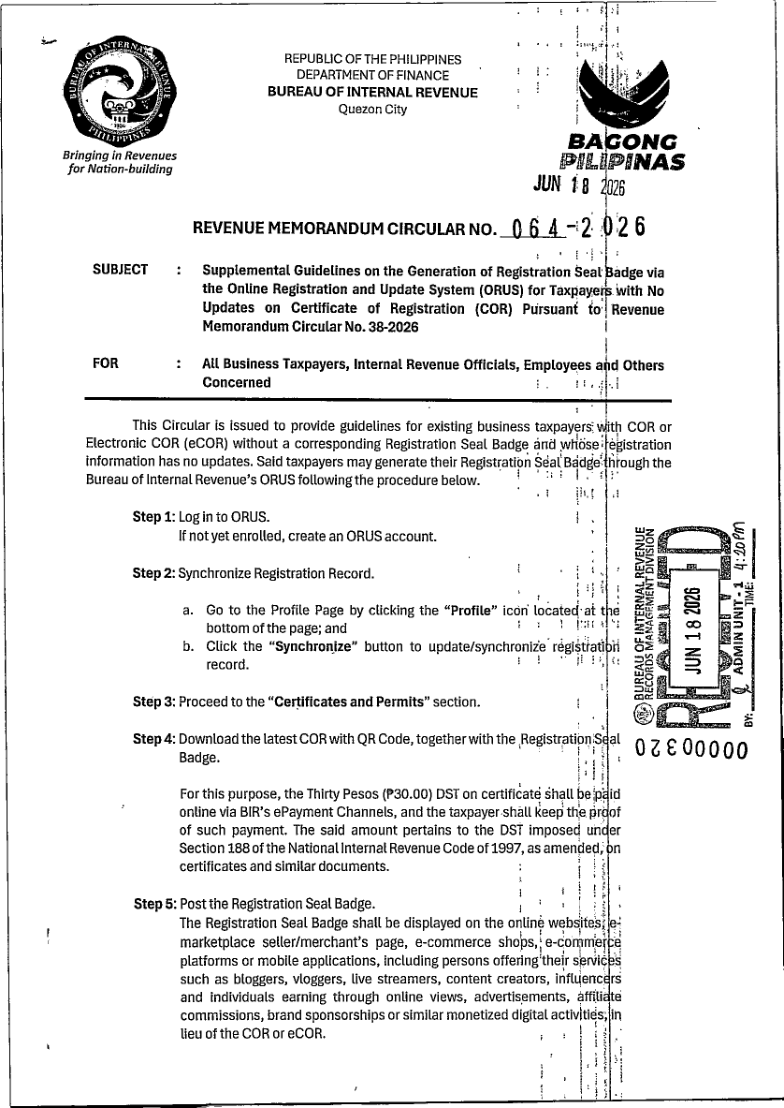
RMC 64-2026 gives this route for existing business taxpayers whose registration details are unchanged. Have your ORUS login and certificate payment record ready.
- Log in to ORUS; enroll first if you do not have an account.
- Open your Profile page using the profile icon.
- Select Synchronize to synchronize the registration record.
- Open Certificates and Permits.
- Download the latest QR-enabled COR together with the registration seal badge.
- Follow the circular's ₱30 DST requirement through BIR's electronic payment channels and keep proof of payment.
- Display your badge on the relevant business pages.
See the official instructions for registrations with no changes
New to BIR registration? Follow this sequence
You cannot create a valid badge by editing a sample image. BIR first needs a registration record for your activity. The following is the individual-applicant route; companies use a different registration form.
1. Establish what is already registered
Find your existing TIN, if you have one, and any COR. Write down what you actually do: create sponsored content, earn platform income, sell products, provide services, or a combination. If you have already started earning, tell the RDO or your practitioner when you started so they can check any outstanding obligations.
2. Prepare your account and documents
For an individual application, BIR's published registration checklist asks for Form 1901 and a government ID showing your name, address and birthdate. If the ID does not show an address, prepare additional proof of residence or business address in your name. PRC-regulated professionals have a separate PRC-ID requirement; being a vlogger does not make you a PRC professional.
For the invoicing choice, decide whether to use BIR Printed Invoices or obtain authority to print your own. Representative, business-name and other documents apply according to your circumstances. Use the BIR documentary checklist to check the applicable items, rather than treating every listed document as compulsory for everyone.
A bookkeeper can help prepare the application. Use an email address you control and retain your submissions, representative authorization and payment records. Do not send passwords or one-time codes through an enquiry form.
3. Create or access your ORUS account
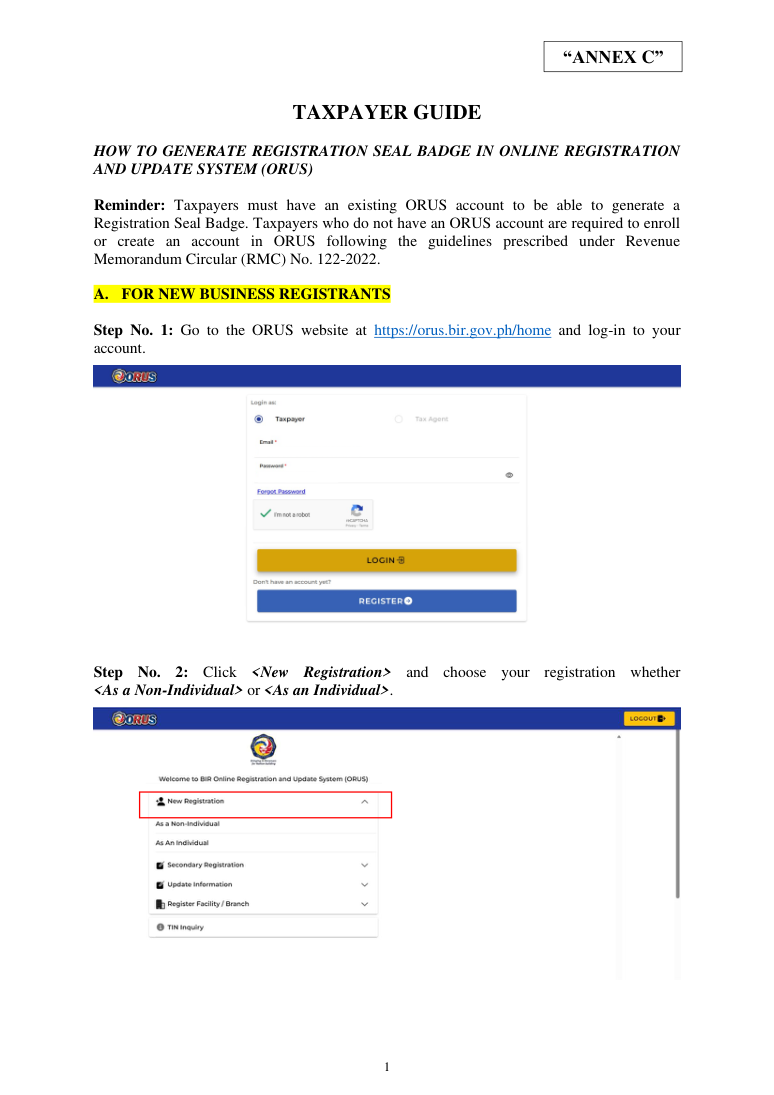
Open orus.bir.gov.ph/home. ORUS means Online Registration and Update System; the official instructions use a website. Use your own taxpayer account, or an appropriately authorized representative arrangement.
4. Complete the appropriate application
For the activity classification, RMC 38-2026 lists PSOC 5990 for an individual online content creator and PSIC 47913 for retail sales via the internet. Choose what you actually do; a creator who also sells goods should clarify the relevant activities with the RDO rather than treating the two codes as interchangeable. Official classification table.
For an individual, choose New Registration, the individual option and Form 1901. Work through taxpayer details, representation where relevant, address, business activities, tax types, invoicing and attachments. Use your actual activity and circumstances. A tax election is a separate decision, not something to select merely to obtain the badge.
5. Review, submit and wait for the RDO
Check your information and attachments before submission. Save the reference and watch for questions or corrections. BIR's Annex C, page 10, describes approval within three working days; that is its published process, not a guaranteed turnaround from us. An incomplete application needs attention before it can progress.
6. Pay, download and check
After approval, follow the ₱30 loose DST payment instructions, retain the receipt and return to your profile to obtain the issued documents. Find the badge with your COR download and check your registration details. BIR Annex C contains the full illustrated registration sequence.
7. Finish the rest of your setup
Display the badge, but also complete the books, invoicing and filing arrangements applicable to your registration. Keep your first filing dates somewhere you will see them. If you want help understanding what applies after registration, use our BIR registration service enquiry.
If your registration details need updating
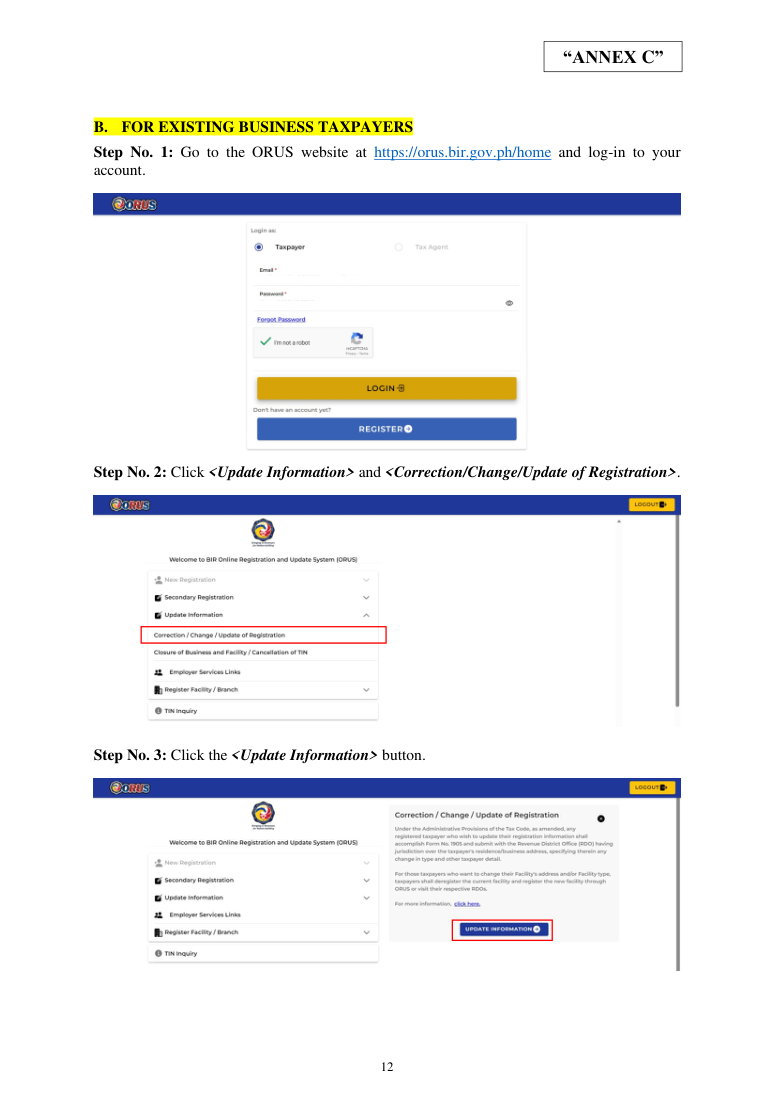
Use the update route in BIR's Annex C: choose Update Information, then the correction/change/update option. Identify the head office or branch, select the information that genuinely needs changing, complete the relevant fields and review the submission. Follow the payment and certificate-generation instructions after processing. Your registered RDO is the alternative if the online route cannot resolve your record.
What will you pay?
Under the 2026 BIR circulars, the badge itself is free and the certificate DST is ₱30. The table separates government charges from optional assistance.
| Item | Amount | What it covers |
|---|---|---|
| Registration seal badge | ₱0 | Badge issuance, per RMC 38-2026 |
| Loose documentary stamp tax | ₱30 | The certificate, per RMC 64-2026; retain payment proof |
| Bookkeeper or other assistance | Separate quote | Optional professional work, not a BIR badge fee |
These charges do not cover every cost of starting a business. Document preparation, invoice printing, local requirements and optional professional assistance may add costs.
The display deadline is October 31, 2026
RMC 99-2026 extends the period to secure and display the badge until October 31, 2026. During that extension, penalties are not imposed solely for failure to display it. This does not postpone registration, tax returns or tax payments, and it does not cancel unrelated liabilities. The circular still calls for prompt compliance.
RMC 99-2026: deadline extension and its limits.
Who needs the badge, and what does it confirm?
The badge replaces the full Certificate of Registration for public online display. It is not a social-media verification mark, tax clearance or endorsement of a seller’s products.
The requirement covers relevant online businesses and service providers, including monetized creators. Having followers is not, by itself, the same as carrying on a taxable business. For how platform payments and sponsorships are treated, read our content creator tax guide. Source: RMC 38-2026.
Where to display it: creators, Shopee and other shops
Display the badge rather than your full COR. RMC 38-2026 requires covered businesses to make it visible and accessible online.
- Upload the complete BIR-issued image without altering its design or QR code.
- Open the public page as a visitor on a phone. Check that the image is readable without account-owner access.
- Scan the code and confirm the destination is verify.bir.gov.ph/correspondence/ before relying on the result. If it fails, use the QR troubleshooting below.
| Business channel | Where to start |
|---|---|
| Your website | A publicly accessible business page where visitors can see the badge. |
| Shopee or TikTok Shop | Check the current seller instructions or seller support for the public display location. Private verification uploads are a separate step. |
| Facebook, YouTube or another creator profile | Use an available public image placement on the business profile. View it while logged out to check visibility. |
If the badge will not download or the QR code fails
I downloaded the badge, but ORUS did not ask me to pay
A missing prompt does not override the certificate DST instruction in RMC 64-2026. Check your payment records first. If you have no receipt for the applicable certificate transaction, ask your registered RDO which BIR electronic payment route to use. Do not assume that downloading the document proves payment, or submit a duplicate payment without checking.
Do I have to replace an old COR without a QR code?
RMC 38-2026 does not require every taxpayer to replace an existing COR just because it lacks a QR code. Covered online businesses still need their registration seal badge; use the applicable route above to obtain it.
I have a TIN but no certificate or badge
Check whether you are registered for business or professional activity, rather than only as an employee. Ask your RDO to clarify the record before applying again or creating a second TIN.
My information looks old
Synchronize the record first. If it is still wrong, use the appropriate update process or contact your registered RDO. Do not edit the downloaded document to make it match.
The QR code does not scan
Try the original downloaded file at a readable size rather than a compressed social-media copy. Check that the whole code is visible. If the code scans but the verification result is invalid or mismatched, save the error and contact the RDO. A failed scan alone does not establish the cause; avoid paying a third party to make a replacement QR code.
ORUS is unavailable or my payment is not reflected
Keep the application reference, payment receipt and time of the problem. Retry the official portal and seek help from your registered RDO if unresolved. Do not assume an outage extends a deadline unless BIR issues an applicable extension, and do not pay again simply because the screen has not refreshed.
Can I use a sample badge or buy one?
No sample image can establish your registration. Obtain the document through BIR. A professional may charge for assistance, but that fee is separate from BIR's free badge and the applicable certificate DST.
THE INTERVIEW
“It was easy”: Elena on getting her BIR badge
Aditya Aman spoke with Ma Elena B Ignacio, the creator behind Adele Vlogs and Elena sa India, about the process and what tax compliance means for her work.
Interview by Aditya Aman. Quotation lightly edited for clarity; the other answers are paraphrased.
How was your experience getting the badge?
“I have a bookkeeper, and I just have to pay the taxes and compile the income and expenses.”
How do you feel about the requirement?
She sees the legal purpose of it, although paying tax reduces the money she keeps. Her support for compliance does not mean she finds the financial burden easy.
Is it fair for creators to pay tax like other businesses?
She believes it is. Creating content also takes work, but that does not remove the responsibility to contribute fairly alongside traditional business owners and other income earners.
How long did getting the badge take?
Elena recalled downloading it in a few minutes. First-time registration and corrections take longer because BIR must process the application before the documents are available.
Find her work on Facebook · Adele Vlogs, YouTube · Adele Vlogs and TikTok · Elena sa India.
Before you consider it done
This checklist does not send information or save your selections. Print or save a copy if needed.
Sources and review
Our About page explains who runs TaxCalculator.com.ph. For a correction or source issue, contact the editorial team.
- BIR RMC 38-2026: badge issuance and online display.
- BIR RMC 38-2026 Annex C: illustrated ORUS registration and update instructions.
- BIR RMC 64-2026: existing registrants without COR changes.
- BIR RMC 99-2026: October 31 display extension.
Independent guidance from TaxCalculator.com.ph. ORUS images are from BIR’s published instructions.